
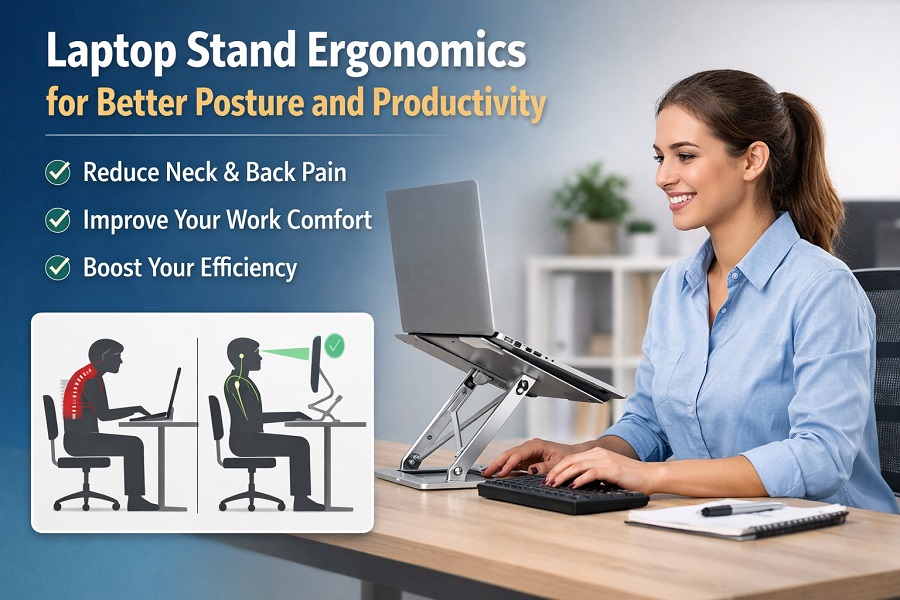
In today’s digital-first world, laptops have become essential tools for work, study, and entertainment. However, using a laptop for long hours without proper ergonomics can lead to neck pain, back strain, eye fatigue, and reduced productivity. This is where laptop stand ergonomics plays a crucial role. A well-designed laptop stand can transform your workspace, helping you maintain better posture, work comfortably, and stay focused throughout the day.
What Is Laptop Stand Ergonomics?
Laptop stand ergonomics refers to the practice of positioning your laptop at the correct height and angle to support a natural and healthy body posture. Unlike desktop computers, laptops combine the screen and keyboard into one unit, forcing users to bend their necks downward for long periods. Over time, this poor posture can cause musculoskeletal problems.
An ergonomic laptop stand elevates your screen to eye level, allowing your neck, shoulders, and spine to stay in a neutral position. When combined with an external keyboard and mouse, it creates a workstation that closely matches ideal ergonomic standards.
Why Ergonomics Matters When Using a Laptop
Poor laptop ergonomics is one of the most common causes of work-related discomfort. Looking down at a laptop screen increases pressure on the neck and upper spine. Slouching forward strains the lower back, while improper wrist angles can lead to repetitive strain injuries.
Using an ergonomic laptop stand helps prevent these issues by:
- Reducing neck and shoulder tension
- Supporting proper spinal alignment
- Minimizing wrist and hand strain
- Lowering the risk of long-term posture problems
Over time, these benefits contribute to better physical health and fewer work-related aches.
How a Laptop Stand Improves Posture
The primary ergonomic advantage of a laptop stand is improved posture. By raising the laptop screen to eye level, the stand encourages you to sit upright instead of leaning forward. This helps maintain the natural curve of your spine and keeps your shoulders relaxed.
Good posture also improves breathing and circulation, which can reduce fatigue and increase concentration. When your body is comfortable and properly aligned, you are less likely to shift positions frequently or experience discomfort during long working hours.
Comfort and Productivity Benefits
Comfort and productivity are closely linked. Discomfort can be distracting and draining, making it harder to focus on tasks. An ergonomic laptop stand enhances comfort by providing a better viewing angle and reducing physical strain.
Many laptop stands also improve airflow around the device, helping prevent overheating. A cooler laptop runs more efficiently, which can improve performance and extend the lifespan of your device. With fewer distractions caused by discomfort or technical issues, you can work more efficiently and complete tasks faster.
Choosing the Right Ergonomic Laptop Stand
Not all laptop stands offer the same ergonomic benefits. When choosing a stand, consider the following factors:
- Adjustability: Adjustable stands allow you to customize height and angle for your specific needs.
- Stability: A sturdy stand prevents wobbling and keeps your laptop secure.
- Material: Metal stands offer durability and better heat dissipation, plastic stands are lightweight and portable, while wooden stands provide a stylish, natural look.
- Portability: Foldable or lightweight stands are ideal for remote workers and travelers.
Selecting a stand that suits your work style ensures maximum ergonomic benefit.
Ideal Ergonomic Setup with a Laptop Stand
For best results, a laptop stand should be part of a complete ergonomic setup. Place the laptop so the top of the screen is at or slightly below eye level. Use an external keyboard and mouse positioned at elbow height, keeping your wrists straight and relaxed. Sit in a chair that supports your lower back, and keep your feet flat on the floor.
Taking regular breaks and stretching throughout the day further enhances the benefits of an ergonomic workstation.
Who Should Use a Laptop Stand?
Laptop stand ergonomics is beneficial for everyone who uses a laptop regularly. This includes:
- Work-from-home professionals
- Office employees
- Students attending online classes
- Freelancers and digital nomads
Anyone spending more than a few hours a day on a laptop can significantly benefit from using an ergonomic stand.
Conclusion
Laptop stand ergonomics is not just about comfort—it is an investment in your long-term health and productivity. By elevating your laptop to the correct height, a laptop stand helps improve posture, reduce physical strain, and create a more efficient workspace. Whether you work from home, in an office, or on the go, using an ergonomic laptop stand can make a noticeable difference in how you feel and perform every day. Choosing the right stand and setting up your workspace correctly is a simple yet powerful step toward healthier and more productive laptop use.